CapTeam
Capstone grand prize, 2026 1st semester
A service that connects student survey data to AI team recommendations, lets admins review, adjust, and approve the results, and carries them through to team operations.
Project details
The problem
Surveys alone could not reflect a student's role, skill level and project experience at once. Even after the teams were set, notices, logs, plans and chat lived in separate places, so there was no way to see progress at a glance.
Service flow
- Feed survey data into AI team recommendations
- Let an admin review the reasoning, swap members and approve
- Connect the confirmed team and its tools to the student screens
- Bring notices, logs, project plans and chat into one flow
- Sign in
- Survey
- AI recommendation
- Admin review
- Swap and approve
- Team work
- Notices, logs, plans, chat
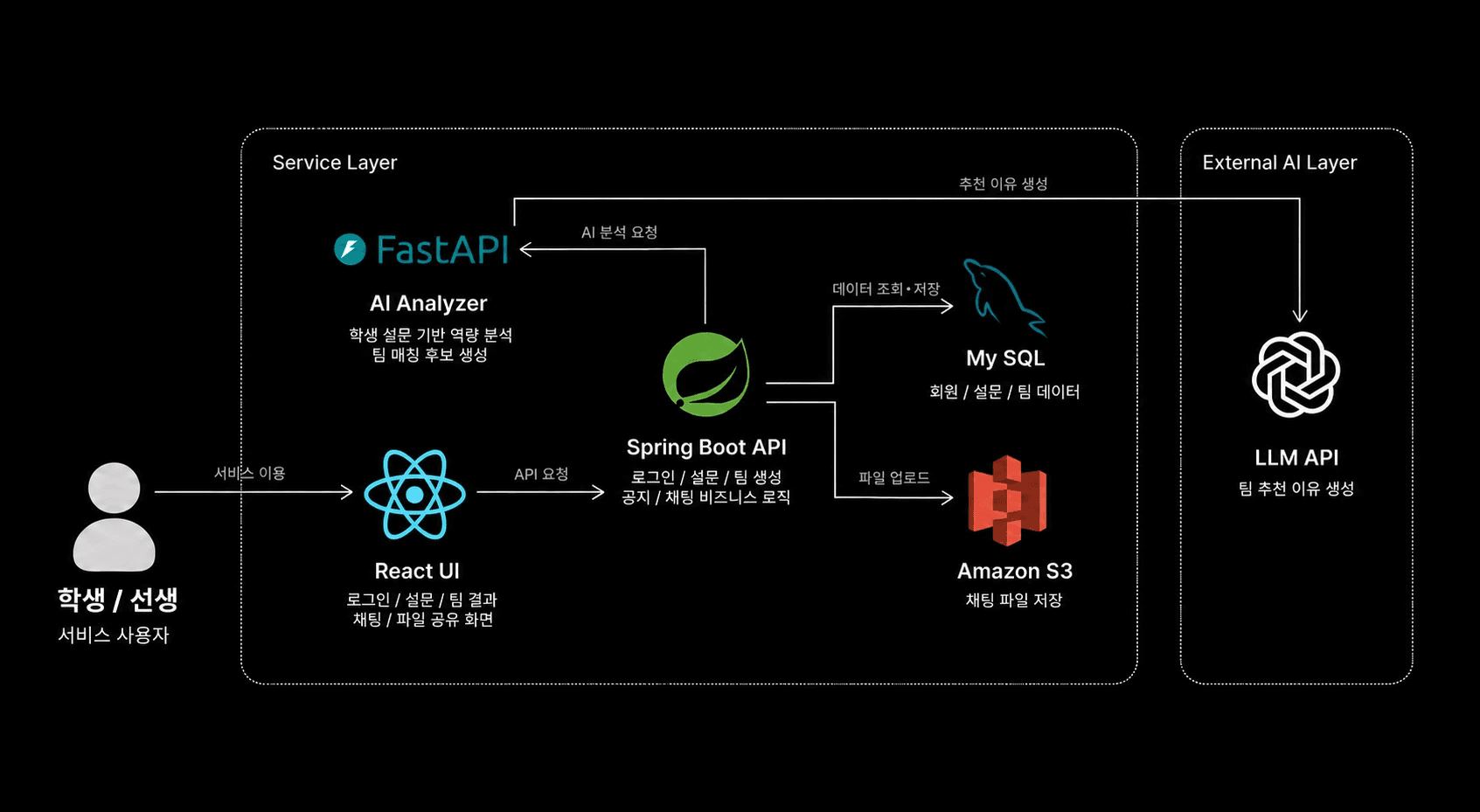
Service architecture
My role and contribution
Service structure and screen design
Split the service into student and admin roles and designed the screen structure.
- Student and admin flows
- Sign-in, survey, team management, notices, logs, plans and chat screens
- Loading, error and empty states
Access, auth and API flow
Divided access by route and tied token state to API calls.
- Separate /admin and /user routes
- Access control with ProtectedRoute
- User and token state with Axios JWT
- Checked access by team, survey and log state
AI team creation and management
Tracked AI team creation on the screen and built the flow through to admin approval.
- Stored the jobId of each AI task
- Showed progress, success and failure by polling
- Blocked duplicate requests
- Built the review, swap and approval flow
Realtime chat and verification
Built team chat on STOMP and WebSocket and verified it down to mobile.
- Team chat over STOMP and WebSocket
- Sending, read state and unread badges
- Checked mobile viewports and E2E scenarios
Troubleshooting
01Duplicate AI team requests and lost progress on reload
- Situation
- AI team creation returned a job id and ran on the server. Pressing the button again or reloading could create a duplicate job or lose the progress.
- Task
- I had to identify a job once it started, so that re-entering the page could keep reading the state of the same jobId.
- Action
- Stored the jobId right after the request
- Locked the button and blocked re-requests while a job was running
- Reflected progress, success and failure by polling on the jobId
- Restored the saved job on reload and re-entry
- Result
- Duplicate team creation blocked
- Admins no longer lose track of progress
02Repeated API calls and rising server requests
- Situation
- E2E and Network logs showed dashboard, header, unread and channel summary requests repeating on every screen change and poll. The admin chat list also had an N+1 pattern.
- Task
- I had to cut unnecessary calls and concurrent duplicate requests while keeping the feature working.
- Action
- A short TTL cache, with in-flight requests shared
- Skipped unread polling in background tabs
- Moved updates onto WebSocket events
- Removed the duplicate read call when a channel is selected
- Recorded that removing the N+1 pattern fully needs a batch API on the backend
- Result
- Fewer repeated calls and edge requests
- Clear split between frontend fixes and backend work
03UI and accessibility warnings found through E2E
- Situation
- Walking teacher and student flows at 390, 412 and 768px surfaced nested list items, duplicate React keys and horizontal overflow on mobile.
- Task
- I had to clear warnings that do not look like bugs, and verify the permission, empty and exception flows again.
- Action
- Rewrote the notice list as ul → li → link
- Applied React keys based on team and order
- Checked wrong sign-in, protected routes, survey completion, log time guards and empty input validation
- Re-checked horizontal overflow on mobile and Console warnings
- Result
- Overflow and React warnings gone on the screens I tested
- A verification pass covering access, empty states and exceptions
Using AI, and verifying it
The problem definition, service flow and screen design were my own work. In later implementation and maintenance I relied heavily on Codex, and checked what it produced in the browser, in Console and Network, and through builds, lint, E2E and mobile viewports.
What I learned
Screens are not the whole job — data flow and the runtime environment matter
- I learned that repeated calls are not just a speed problem — they add load on the server.
- Wiring up polling myself, I found that a start condition is not enough — it needs a stop condition and a way to resume.
- I came away with a basis for telling apart what the frontend can fix and what needs a backend API change.
When you build with AI, verification is still yours
- I saw for myself that code being written is not the same as it working in the real flow.
- With features that carry state — JWT, polling, WebSocket — I got into the habit of following the data flow all the way through.
- Even when I leaned on AI, I learned that defining the requirement and verifying the result stay with me.